

Dean has been part of Qimtek since 1999 and has worked across the business in a variety of roles, becoming Membership Manager in 2012. Over the years, he has supported hundreds of manufacturers and engineering businesses in generating new opportunities through the platform, while also providing hands-on sales and marketing guidance where needed. His primary focus is helping Qimtek supplier members maximise their value, strengthen relationships, and grow sustainable manufacturing networks

PART 2
Following on from our previous blog 'Setting Up A LinkedIn Business Page For Your Engineering Company', which should now be as complete as possible, we will explore how to attract the right people to see it. You will need to do this by inviting your contacts & prospects to follow your new company page. But how do you do that? A common misconception is that your connections will automatically see the content that your company posts but this is not the case. They will need to follow your page to see them (unless you share them but this does not gather as much traction). So, the first important thing to appreciate is that you cannot search and connect with people through your business page. You need to ask YOUR personal connections to follow it. With this in mind, the first task should be ensuring that you and your admin users are connected to your existing customers.
Start Connecting With Your Customers & Prospects ASAP
Start by compiling a list of current customers and if you have them, prospects. Search for your initial contact and send them an invitation to connect. To extend your reach further, consider connecting with their colleagues as well. For example, your contact might be a design engineer, but LinkedIn might also list their Supply Chain Director, whom you don’t know. It could be worthwhile to invite them to connect as well.
So how do you do this? Well, the easiest way is to search for the company first and view their business profile. Here, you will usually see a link showing the number of employees connected to the company, such as "11-50 employees."
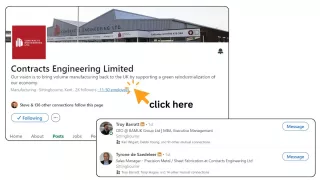
By clicking on this link, you can view a list of employees to invite to connect. For best results, include a personal note in your invitation, such as, "We are already one of your suppliers and would like to connect." You will likley have a limited ammount of personal notes/messages on the free account and you may need to consider upgrading to Linkedin Premium to get more features. While you're on their profile, you should also consider following their company. This way, you can see their posts, and by liking or commenting on them, you show interest in their business, which may lead to more enquiries.
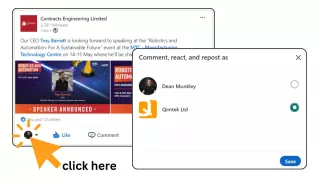
GOOD TO KNOW: As a admin user when liking, sharing and commenting on other peoples or business posts, and depending on what is more relevant, you can do this as yourself or on behalf of your company but clicking on the small profile image in the bottom left of the post to select you you would like the comment to be from.
TIP: You should be able to send around 100 connection requests per week per for your personal profile and by using techniques like improving your Social Selling Index (SSI) Score which considers factors like the number of connections you have in common, the quality of your interactions, and your responsiveness to messages and inquiries. Again, you will likely need to updgrade to Linkedin Premium or Sales Navigator to start this process.
Next up, Invite Your Connections To Follow Your Company Page.
You can grow your follower base by inviting your 1st-degree connections to follow your Page. The invitation will include your name, so they will know who sent the invite. Each month you will only have a limited number of people you can invite to follow and depending on the size of your network will determine how many so we recommend that you only send page invitations to connections who are likely to be interested in your Page.
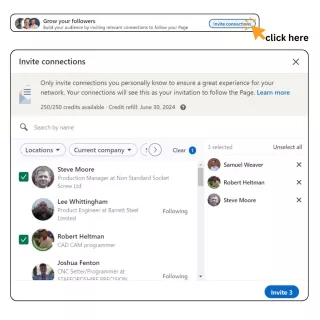
Start by going to your Page super or content admin view and clicking on Analytics in the left menu somewhere you will see the "Grow your followers" section. Click the "Invite connections" button and from there, you can complete one or more of the following actions: search for a connection using the "Search by name" field, use filters to refine your search, or select connections from the populated list.
Once you have selected your connections, click "Invite." Your connections will receive an invitation notification from your personal LinkedIn profile. If an error appears, you might have reached your invitation limit and you check your available invitation credits by clicking "Invite connections" in the upper-right corner of your admin view.
Remember To Invite All Of Your New Contacts As You Go Along
Here's a strategy I've learned from a past mistake, forgetting to connect with new contacts I meet each week. Now, I have a new process: I maintain a spreadsheet of new contacts and every Friday, I review this list, searching for them and their colleagues on LinkedIn, and sending connection invites. It's crucial to remember to follow up - either the following Friday or as soon as they accept your invitation to connect - by inviting them to follow your LinkedIn page. This ensures you steadily grow your network and maintain engagement with new connections.
Bonus Tip: When viewing someone's profile on LinkedIn via desktop, you should see a section on the right-hand side called "Other Similar Profiles." This section displays individuals with similar roles at comparable companies. For example, if you're looking at a profile of a buyer from a company that manufactures tractors, the "Other Similar Profiles" section will likely show buyers from other similar companies. These profiles represent potential valuable connections worth exploring.
Conclusion - It takes time but you just have to do it!
To conclude, growing your manufacturing network on LinkedIn and gaining followers for your company page is a gradual process that requires consistent effort and strategic engagement. By connecting with your existing customers and prospects, inviting them to follow your page, and keeping track of new contacts, you can steadily build a robust LinkedIn presence. Remember, the key is to be proactive and persistent.
As you continue to grow your network, the next step is to focus on what content to share. Engaging and relevant posts are essential for maintaining and expanding your follower base. In our next blog, "What Should Engineering Companies Post on LinkedIn?", we'll explore effective content strategies to keep your audience engaged and interested in your company. Stay tuned!
Qimtek Linkedin Guides:
- Setting Up A Linkedin Business Page For Your Engineering Company
- How to Grow Your Manufacturing Network on LinkedIn (this page)
Sources:
- Hubspot Guide - The Beginner's Guide to LinkedIn Marketing & Networking
- Linkedin Help - Invitation limits for your LinkedIn Page
- Linkedin Help - Invite connections to follow your Linkedin page
- Linkedin Help - Best Practices
- Linkedin Help - Difference between a Linkedin Profile and a Linkedin Page
- Linkedin Guide - How to create a Linkedin Company Page
- Hootsuite Guide - How To Use Linkedin For Business