

Dean has been part of Qimtek since 1999 and has worked across the business in a variety of roles, becoming Membership Manager in 2012. Over the years, he has supported hundreds of manufacturers and engineering businesses in generating new opportunities through the platform, while also providing hands-on sales and marketing guidance where needed. His primary focus is helping Qimtek supplier members maximise their value, strengthen relationships, and grow sustainable manufacturing networks

PART 1
As the Supplier Membership Manager at Qimtek, I regularly speak with owners and senior managers of engineering companies to review their current sales processes, marketing strategies, and how to win new business using our Live RFQs (Request for Quotes). A common theme that emerges, whether they are startups or established firms, is the oversight of creating a dedicated LinkedIn page for their business, called a Linkedin Business Page, despite having a good personal LinkedIn profile.
What is a LinkedIn Business Page?
An effectively managed LinkedIn Business Page can significantly benefit your engineering company as it serves as a platform to share your projects and achievements and helps build a professional network.
By posting updates about new technologies, industry trends, and company milestones, you position your firm as a thought leader in the engineering domain. This approach allows you to stay visible to your customers, reminding them of your presence and the range of services you offer. Moreover, in the current skill shortage climate, a well-crafted LinkedIn business page can attract skilled engineers and professionals looking for job opportunities, showcasing your company culture and career prospects to appeal to top talent in the industry.
Your customers are on Linkedin and so are your competitors and therefore - so should you! Ultimately, aside from the time investment, creating and maintaining a LinkedIn Business Page is free.
How To Check If You Have A Linkedin Business Page
Chances are if you are reading this, then you do not have a business profile but just in case you can search Linkedin and you will either see a list of employees who work in the company or the company itself. If you do not see the company, then it is worth clicking onto one of the employees to see where they currently work and follow that link. If you do not have a business page it will look like this:

Tip: Keep in mind that you can only have one active company page on LinkedIn at a time. If you're revamping or updating your company's LinkedIn presence, you'll need to either update the existing page or delete it and create a new one from scratch.
How To Create Your LinkedIn Business Page
Not just anyone can set up a Company Page on LinkedIn; there are specific prerequisites to ensure you represent a legitimate engineering firm. Here’s what you need to meet:
- Personal Profile Age:
Your personal LinkedIn profile must be older than 7 days. You cannot set up a Company Page with a brand-new personal profile.
- Matching Information:
Your personal information must match the details on your Company Page. For example, your first and last name must be consistent.
- Profile Strength:
Your personal profile must have a strength rating of “Intermediate” or “All Star.” This rating is based on the completeness of your profile, which you can check on your profile homepage.
- Company Email Domain:
The Company Page must be associated with a company email domain unique to your firm.
If you meet these requirements then creating a LinkedIn business page is a straightforward process. Follow these steps to establish a professional and engaging page for your engineering firm:
- Sign in to LinkedIn:
Start by logging into your LinkedIn account. If you don’t have one, you’ll need to create a personal profile before setting up a business page.
- Access the Business Page Creation Tool:
Click on the “Work” icon in the top right corner of your LinkedIn homepage. From the dropdown menu, select “Create a Company Page”.
- Choose Your Page Type:
LinkedIn offers several options, including “Small Business”, “Medium to Large Business”, and “Showcase Page”. For most engineering firms, selecting either “Small Business” or “Medium to Large Business” will be appropriate depending on your company size.
- Enter Your Company Details:
Fill in the required information such as your company name, LinkedIn public URL, website, and industry. Make sure to choose “Engineering” as your industry to ensure your page reaches the right audience.
- Add Profile Details:
Upload a high-quality logo and a banner image that represents your brand. Write a compelling company description that outlines your engineering services, mission, and what sets you apart in the industry. Include keywords relevant to your field to improve your page’s searchability.
- Complete Your Profile:
Enter additional information like your company size, year founded, and specialties. These details help visitors understand more about your firm and its capabilities. More below about this in the next section.
- Publish Your Page:
Once you’ve completed all the sections, review your information for accuracy and completeness. Click “Create Page” to publish your LinkedIn business page.
For a more detailed step-by-step guide, you can visit LinkedIn's official help page here.
Setting Up Your LinkedIn Company Profile
The key to optimising your LinkedIn Company Page is to fill out all fields with the necessary information—this makes it more searchable. Follow these steps to ensure visibility.
- Complete all of your profile:
This first tip might seem obvious, but it’s crucial. According to LinkedIn, fully completed Company Pages receive over 30% more views. The more information you provide, the easier it is for others to discover your engineering company. Take the time to fill out every detail on your Company Page, even those not marked as required—they might be essential in the long run.
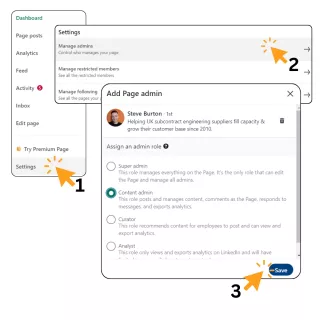
- Add your team to admin:
Managing your company’s LinkedIn page can be challenging, especially if you are also handling other things like estimating and running a factory. Adding other Page administrators can help share the workload.
- Add your logo and cover photos:
Your cover photo and page logo are the first images visitors see, visually introducing potential connections to your brand. Ensure your marketing efforts are cohesive by keeping these images up-to-date so they match your website and all other digital marketing materials. This cohesion not only boosts your brand awareness but also helps new customers and employees familiarise themselves with your engineering firm on LinkedIn.
TIP: Canva is an excellent free online software that can help you to produce the images you will need for your business page. The free version has lots of templates, images and text styles you can use and the editing process is fairly easy to navigate. It can also be a very useful tool when building posts for future content.
Conclusion - Basically, you 100% should have a business page!
Setting up a LinkedIn business page for your engineering company is a crucial step in establishing a strong online presence. By showcasing your projects, industry insights, and company culture, you can build a professional network and attract top talent. Remember, a fully completed and regularly updated LinkedIn page not only enhances your visibility but also positions your firm as a leader in the engineering domain.
As we move forward, it's essential to focus on growing your network and engaging effectively with your audience. In our next blog, "How to Grow Your Manufacturing Network on LinkedIn" we'll explore strategies to expand your reach, the types of content to share, and how to leverage LinkedIn to its fullest potential.
Qimtek Linkedin Guides:
- Setting Up A Linkedin Business Page For Your Engineering Company (this page)
- How to Grow Your Manufacturing Network on LinkedIn
Sources:
- Hubspot Guide - The Beginner's Guide to LinkedIn Marketing & Networking
- Linkedin Help - Invitation limits for your LinkedIn Page
- Linkedin Help - Invite connections to follow your Linkedin page
- Linkedin Help - Best Practices
- Linkedin Help - Difference between a Linkedin Profile and a Linkedin Page
- Linkedin Guide - How to create a Linkedin Company Page
- Hootsuite Guide - How To Use Linkedin For Business